 Docs
Docs
Chart II
Chart te ayuda a visualizar datos fácilmente usando JavaScript. Soporta 8 tipos diferentes de gráficos (incluyendo barras, líneas y sectores), y todos son responsivos.
Tipos de gráficos
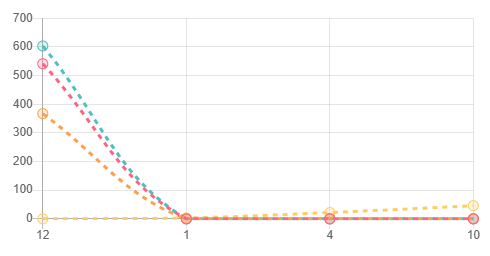
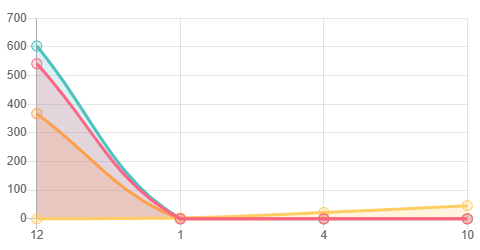
En este ejemplo estamos usando una consulta basada en objetos del modelo de datos. Todos los gráficos de los ejemplos de este artículo utilizan la siguiente consulta:
SELECT month(modify_date) AS Mes, year(modify_date) AS year, type_Desc AS Clave, COUNT(type_Desc) AS value
FROM sys.objects
WHERE type_Desc IN ('SYSTEM_TABLE','PRIMARY_KEY_CONSTRAINT','User_Table','FOREIGN_KEY_CONSTRAINT')
GROUP BY type_Desc, month(modify_date), year(modify_date)
Puedes añadir opcionalmente campos de color de fondo y color de borde.
SELECT month(modify_date) AS Mes, year(modify_date) AS year, type_Desc AS Clave, COUNT(type_Desc) AS value, backgroundColor AS backgroundColor, borderColor AS borderColor
FROM sys.objects
WHERE type_Desc IN ('SYSTEM_TABLE','PRIMARY_KEY_CONSTRAINT','User_Table','FOREIGN_KEY_CONSTRAINT')
GROUP BY type_Desc, month(modify_date), year(modify_date)
Ahora puedes añadir directamente el componente web flx-chart en una plantilla flx-list.
<flx-chart series="Clave" labels="Mes" value="value" type="line" options="{}" chartsetting="syscs-default-nolegendandlabels"></flx-chart>
Usar solo en el header o footer para evitar duplicar el mismo gráfico N veces.
Si el tipo de gráfico es line, existen atributos adicionales para modificar el estilo:
- borderdash: true|false
- linefill: true|false
Line Border Dashed Chart
Line Fill Chart
También hay una opción de filtrado que puedes usar pulsando el siguiente botón:
Para hacer este filtrado, alternamos las etiquetas del gráfico con:
Hay varios tipos de gráficos que puedes utilizar.
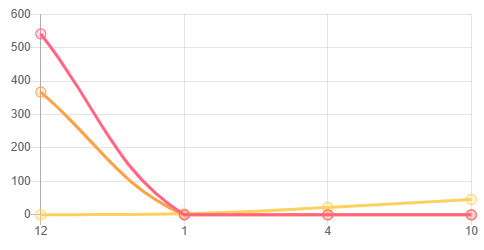
Line Chart
<flx-chart name="sample1" modulename="sysmod-chart-default" type="line" width="200" height="200"></flx-chart>
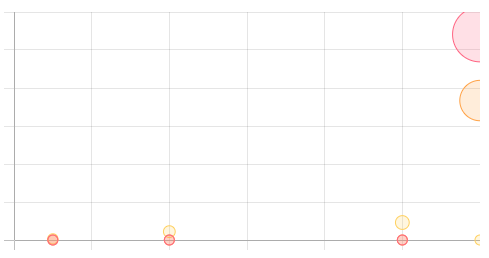
Bubble Chart
<flx-chart name="sample2" modulename="sysmod-chart-default" type="bubble" width="200" height="200"></flx-chart>
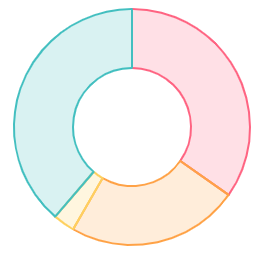
Doughnut Chart
<flx-chart name="sample3" modulename="sysmod-chart-default" type="doughnut" width="200" height="200"></flx-chart>
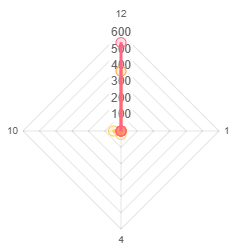
Radar chart
<flx-chart name="sample4" modulename="sysmod-chart-default" type="radar" width="200" height="200"></flx-chart>
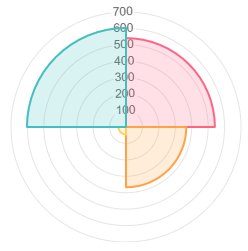
PolarArea chart
<flx-chart name="sample5" modulename="sysmod-chart-default" type="polarArea" width="200" height="200"></flx-chart>
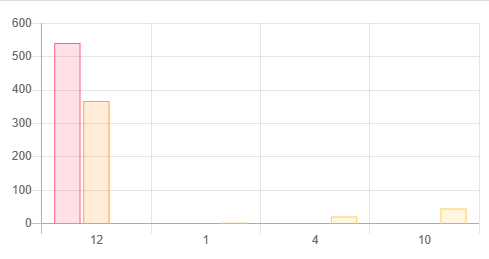
Bar chart
<flx-chart name="sample6" modulename="sysmod-chart-default" type="bar" width="200" height="200"></flx-chart>
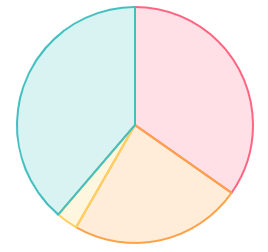
Pie chart
<flx-chart name="sample7" modulename="sysmod-chart-default" type="pie" width="200" height="200"></flx-chart>
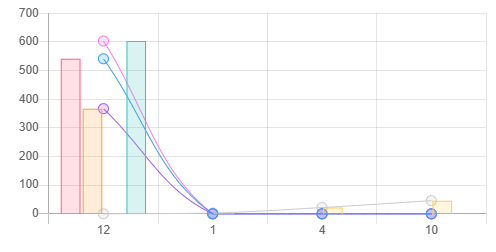
Mixed chart
<flx-chart name="sample8" modulename="sysmod-chart-default-mixed" type="mixed" width="200" height="200"></flx-chart>
Configuración de gráficos
Animaciones
Ahora podemos definir un estilo de animación para cada configuración de gráfico y su duración. Si la duración se establece en 0, las animaciones se desactivan. Más información sobre animaciones aquí.

Configuración de gráficos mixtos
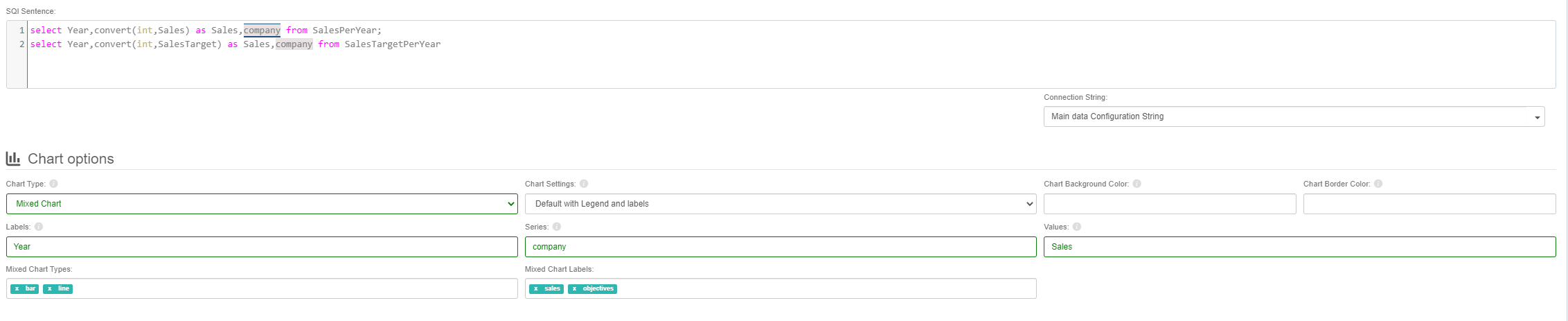
Al configurar un gráfico mixto nuevo, debes definir n sentencias SQL separadas por ;. Luego debes definir qué tipo de gráfico será cada dataset y el nombre que le asignarás.
Estilo de gráficos lineales
Nuevas opciones de estilo para gráficos de líneas.

Datos del gráfico
Explicamos brevemente la estructura de datos de cada gráfico; para más información navega a esta página
Datos de línea
let dataforLineEx = {
  labels: ['Data 1', 'Data 2', 'Data 3', 'Data 4','Data 5', 'Data 6', 'Data 7'],
  datasets: [{
      fillColor: 'rgba(0,0,0,0)',
      backgroundColor: 'rgba(151,187,205,0.5)',
      borderColor: 'rgba(151,187,205,0.5)',
      data: [60, 10, 40, 30, 80, 30, 20]
  }, {
      fillColor: 'rgba(0,0,0,0)',
      backgroundColor: "rgba(220,220,220,0.7)",
      borderColor: "rgba(220,220,220,0.7)",
      data: [20, 30, 80, 20, 40, 10, 60]
  }]
};
Datos de burbuja
let dataBubbleEx = {
    datasets: [{
        label: 'Bubble Chart',
        data: [
            { x: 20, y: 30, r: 5 },
            { x: 30, y: 20, r: 15 },
            { x: 33, y: 19, r: 5 },
            { x: 25, y: 18, r: 20 },
            { x: 40, y: 10, r: 10 }
        ],
        backgroundColor: 'rgba(151,187,205,1)',
        hoverBackgroundColor: 'rgba(151,187,205,1)',
    }]
};
Datos Doughnut y Pie
let dataforDoughnutEx = {
    labels: ["Blue", "Red", "Grey"],
    datasets: [{
        data: [300, 50, 100],
        backgroundColor: [
            'rgba(151,187,205,1)',
            "rgb(153, 38, 0)",
            "rgba(220,220,220,0.5)"
        ],
        hoverBackgroundColor: [
            'rgba(151,187,205,1)',
            "rgb(153, 38, 0)",
            "rgba(220,220,220,0.5)"
        ]
    }]
};
Datos Radar
let dataRadar = {
    labels: ["Eating", "Drinking", "Sleeping", "Designing", "Coding", "Cycling", "Running"],
    datasets: [
        {
            label: "Radar data",
            backgroundColor: "rgba(151,187,205,0.5)",
            borderColor: "rgba(151,187,205,0.5)",
            data: [65, 59, 90, 81, 56, 55, 40]
        },
        {
            label: "Radar data 2",
            backgroundColor: "rgba(220,220,220,0.7)",
            borderColor: "rgba(220,220,220,0.7)",
            data: [28, 48, 40, 19, 96, 27, 100]
        }
    ]
};
Datos PolarArea
let dataPolarArea = {
    datasets: [{
        data: [11, 16, 15],
        backgroundColor: [
            "rgba(151,187,205,0.5)",
            "rgba(220,220,220,0.7)",
            "rgba(153,0,0,0.45)"
        ],
        borderColor: [
            "rgba(151,187,205,0.5)",
            "rgba(220,220,220,0.7)",
            "rgba(153,0,0,0.1)"
        ],
        label: 'PolarArea chart'
    }],
    labels: ["Red", "Green", "Yellow", "Grey", "Blue"]
};
Datos Bar
let dataBar = {
    labels: ["January", "February", "March", "April", "May", "June", "July"],
    datasets: [{
        label: 'Dataset 1',
        backgroundColor: "rgba(220,220,220,0.5)",
        yAxisID: "y-axis-1",
        data: [66, 87, 40, 39, 87, 70, 65]
    }, {
        label: 'Dataset 2',
        backgroundColor: "rgba(151,187,205,0.5)",
        yAxisID: "y-axis-2",
        data: [50, 57, 70, 35, 76, 87, 58]
    }, {
        label: 'Dataset 3',
        backgroundColor: 'rgba(151,187,205,1)',
        yAxisID: "y-axis-1",
        data: [70, 66, 78, 40, 85, 70, 45]
    }]
};
Opciones de gráficos
Aquí solo se explican opciones específicas; para opciones globales consulta el siguiente link
Opciones Line
let optionsLine = {
    responsive: options.Responsive,
    hoverMode: 'label',
    hoverAnimationDuration: 400,
    stacked: false,
    title: {
        display: options.ShowTitle,
        position: options.TitlePosition,
        fontColor: options.TitleFontColor,
        fontFamily: options.TitleFontStyle,
        fontSize: options.TitleFontSize,
        text: options.Title
    },
    animation: {
        animateScale: options.animateScale !== "False",
        animateRotate: options.animateRotate !== "False",
        duration: options.AnimationDuration
    },
    legend: {
        position: options.LegendPos,
        display: options.ShowLegend,
        onClick: function (e, p) {
            original.call(this, e, p);
            var allPageCharts = ctx.htmlItem.closest('main').find('flx-chart');
            if (ctx.options.GroupName) {
                allPageCharts.each(function () {
                    if (!jQuery(this).is(ctx.htmlItem)) {
                        jQuery(this)[0].toggleLabel(p.text, null, ctx.options.GroupName);
                    }
                });
            }
        }
    },
    scales: {
        xAxes: [{ display: true }]
    },
    tooltips: { backgroundColor: options.ToolTipBackgroundColor },
    pointDotRadius: 10,
    bezierCurve: false,
    scaleShowVerticalLines: false,
    scaleGridLineColor: 'black'
};
Opciones Bubble
let optionsBubble = {
    responsive: options.Responsive,
    hoverMode: 'label',
    hoverAnimationDuration: 400,
    stacked: false,
    title: {
        display: options.ShowTitle,
        position: options.TitlePosition,
        fontColor: options.TitleFontColor,
        fontFamily: options.TitleFontStyle,
        fontSize: options.TitleFontSize,
        text: options.Title
    },
    animation: {
        animateScale: options.animateScale !== "False",
        animateRotate: options.animateRotate !== "False",
        duration: options.AnimationDuration
    },
    legend: {
        position: options.LegendPos,
        display: options.ShowLegend,
        onClick: function (e, p) {
            var original = Chart.defaults.global.legend.onClick;
            var allPageCharts = ctx.htmlItem.closest('main').find('flx-chart[link-group="' + ctx.htmlItem.attr('link-group') + '"]');
            if (ctx.options.GroupName) {
                allPageCharts.each(function () {
                    if (!jQuery(this).is(ctx.htmlItem)) {
                        jQuery(this)[0].toggleLabel(p.text, null, ctx.options.GroupName);
                    }
                });
            } else { original.call(this, e, p); }
        }
    },
    elements: { points: { borderWidth: 1, borderColor: 'rgb(0,0,0)' } },
    scales: {
        xAxes: [{ ticks: { callback: value => 'value is ' + value } }],
        yAxes: [{ ticks: { callback: value => 'value is ' + value } }]
    },
    tooltips: { backgroundColor: options.ToolTipBackgroundColor }
};
Opciones Doughnut
let optionsDoughnut = {
    responsive: options.Responsive,
    hoverMode: 'label',
    hoverAnimationDuration: 400,
    stacked: false,
    title: {
        display: options.ShowTitle,
        position: options.TitlePosition,
        fontColor: options.TitleFontColor,
        fontFamily: options.TitleFontStyle,
        fontSize: options.TitleFontSize,
        text: options.Title
    },
    animation: {
        animateScale: options.animateScale !== "False",
        animateRotate: options.animateRotate !== "False",
        duration: options.AnimationDuration
    },
    legend: {
        position: options.LegendPos,
        display: options.ShowLegend,
        onClick: function (e, p) {
            original.call(this, e, p);
            var allPageCharts = ctx.htmlItem.closest('main').find('flx-chart[link-group="' + ctx.htmlItem.attr('link-group') + '"]');
            if (ctx.options.GroupName) {
                allPageCharts.each(function () {
                    if (!jQuery(this).is(ctx.htmlItem)) {
                        jQuery(this)[0].toggleLabel(p.text, null, ctx.options.GroupName);
                    }
                });
            }
        }
    },
    tooltips: { backgroundColor: options.ToolTipBackgroundColor }
};
Opciones Radar
let optionsRadar = {
    responsive: options.Responsive,
    hoverMode: 'label',
    hoverAnimationDuration: 400,
    stacked: false,
    title: {
        display: options.ShowTitle,
        position: options.TitlePosition,
        fontColor: options.TitleFontColor,
        fontFamily: options.TitleFontStyle,
        fontSize: options.TitleFontSize,
        text: options.Title
    },
    animation: {
        animateScale: options.animateScale !== "False",
        animateRotate: options.animateRotate !== "False",
        duration: options.AnimationDuration
    },
    legend: {
        position: options.LegendPos,
        display: options.ShowLegend,
        onClick: function (e, p) {
            original.call(this, e, p);
            var allPageCharts = ctx.htmlItem.closest('main').find('flx-chart[link-group="' + ctx.htmlItem.attr('link-group') + '"]');
            if (ctx.options.GroupName) {
                allPageCharts.each(function () {
                    if (!jQuery(this).is(ctx.htmlItem)) {
                        jQuery(this)[0].toggleLabel(p.text, null, ctx.options.GroupName);
                    }
                });
            }
        }
    },
    scale: {
        reverse: true,
        ticks: { beginAtZero: true }
    },
    tooltips: { backgroundColor: options.ToolTipBackgroundColor }
};
Opciones PolarArea
let optionsPolarArea = {
    responsive: options.Responsive,
    hoverMode: 'label',
    hoverAnimationDuration: 400,
    stacked: false,
    title: {
        display: options.ShowTitle,
        position: options.TitlePosition,
        fontColor: options.TitleFontColor,
        fontFamily: options.TitleFontStyle,
        fontSize: options.TitleFontSize,
        text: options.Title
    },
    animation: {
        animateScale: options.animateScale !== "False",
        animateRotate: options.animateRotate !== "False",
        duration: options.AnimationDuration
    },
    legend: {
        position: options.LegendPos,
        display: options.ShowLegend,
        onClick: function (e, p) {
            original.call(this, e, p);
            var allPageCharts = ctx.htmlItem.closest('main').find('flx-chart[link-group="' + ctx.htmlItem.attr('link-group') + '"]');
            if (ctx.options.GroupName) {
                allPageCharts.each(function () {
                    if (!jQuery(this).is(ctx.htmlItem)) {
                        jQuery(this)[0].toggleLabel(p.text, null, ctx.options.GroupName);
                    }
                });
            }
        }
    },
    tooltips: { backgroundColor: options.ToolTipBackgroundColor },
    elements: { arc: { borderColor: "#000000" } }
};
Opciones Bar
let optionsBar = {
    responsive: options.Responsive,
    hoverMode: 'label',
    hoverAnimationDuration: 400,
    stacked: false,
    title: {
        display: options.ShowTitle,
        position: options.TitlePosition,
        fontColor: options.TitleFontColor,
        fontFamily: options.TitleFontStyle,
        fontSize: options.TitleFontSize,
        text: options.Title
    },
    animation: {
        animateScale: options.animateScale !== "False",
        animateRotate: options.animateRotate !== "False",
        duration: options.AnimationDuration
    },
    legend: {
        position: options.LegendPos,
        display: options.ShowLegend,
        onClick: function (e, p) {
            original.call(this, e, p);
            var allPageCharts = ctx.htmlItem.closest('main').find('flx-chart[link-group="' + ctx.htmlItem.attr('link-group') + '"]');
            if (ctx.options.GroupName) {
                allPageCharts.each(function () {
                    if (!jQuery(this).is(ctx.htmlItem)) {
                        jQuery(this)[0].toggleLabel(p.text, null, ctx.options.GroupName);
                    }
                });
            }
        }
    },
    scales: {
        yAxes: [{
            type: "linear",
            display: true,
            position: "left",
            id: "y-axis-1",
            ticks: { beginAtZero: true, min: 0 }
        }, {
            type: "linear",
            display: false,
            position: "right",
            id: "y-axis-2",
            gridLines: { drawOnChartArea: false }
        }]
    },
    tooltips: { backgroundColor: options.ToolTipBackgroundColor }
};
Opciones Pie
let optionsPie = {
    responsive: options.Responsive,
    hoverMode: 'label',
    hoverAnimationDuration: 400,
    stacked: false,
    title: {
        display: options.ShowTitle,
        position: options.TitlePosition,
        fontColor: options.TitleFontColor,
        fontFamily: options.TitleFontStyle,
        fontSize: options.TitleFontSize,
        text: options.Title
    },
    animation: {
        animateScale: options.animateScale !== "False",
        animateRotate: options.animateRotate !== "False",
        duration: options.AnimationDuration
    },
    legend: {
        position: options.LegendPos,
        display: options.ShowLegend,
        onClick: function (e, p) {
            original.call(this, e, p);
            var allPageCharts = ctx.htmlItem.closest('main').find('flx-chart[link-group="' + ctx.htmlItem.attr('link-group') + '"]');
            if (ctx.options.GroupName) {
                allPageCharts.each(function () {
                    if (!jQuery(this).is(ctx.htmlItem)) {
                        jQuery(this)[0].toggleLabel(p.text, null, ctx.options.GroupName);
                    }
                });
            }
        }
    },
    tooltips: { backgroundColor: options.ToolTipBackgroundColor },
    cutoutPercentage: 0
};